Dear colleagues,
We want to inform you that we changed the display of the org charts in iPeople to display only the Org View.
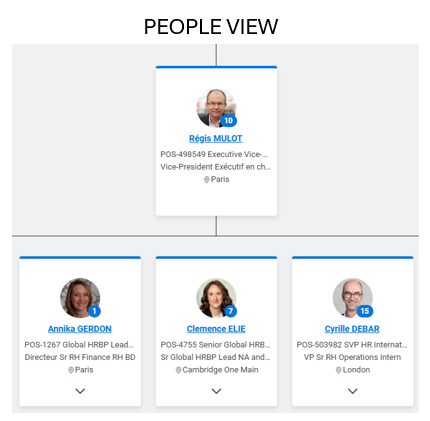
Before the change, you were seeing the People View showing the reporting lines between employees and managers. In this view, managers were displayed only once as per the example shown below:
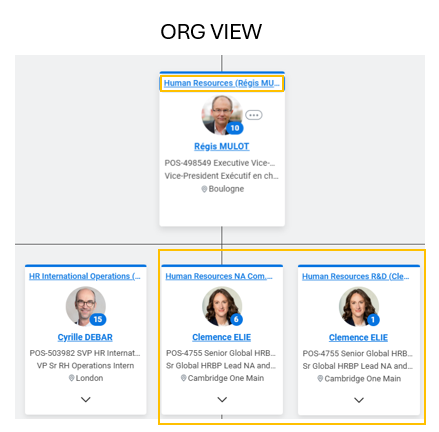
After the change, you see the Org View showing the supervisory organizations with the reporting lines between employees and managers. In the Org view, you can see the name of the supervisory organization in each box, and you see multiple boxes if the person is managing several supervisory organizations.
Why this change?
We made this change because it was difficult to check the accuracy of the org chart with the People View (that did not show the supervisory organizations) and the resulting data quality issues caused numerous problems in the campaigns (such as workflows going to the wrong approver).
We believe that having only one view will help to better maintain the org chart.
Reminders:
- When creating a supervisory organization:
- Do not write the name of the initials of the manager in the name of the supervisory organization. Rather tick the box ‘Include Manager/Leader in Name’ which automatically displays the name of the manager in brackets in the title of the supervisory organization.
- Do not tick the box ‘Include Code in Name’
- Do not create multiple supervisory organizations for the same team.
- Do not leave an active supervisory organization empty if you know that no team will be recruited. In this case, you should inactivate the supervisory organization.
- As a reminder, you can print the org chart using the icon below and then select if you want the data in PPT, PDF or Excel format.

Do you have an action to take as a result of this change?
There is no action needed if your Organization Charts are clean.
You might want to have a look at your scope and see if some “old” supervisory organizations should be removed.
If you need any support to “clean” your org chart in this new Org View, feel free to raise a ticket to the HRIS team.
Best regards
The HRIS team
1 Comment
Thank you for this initiative, much simpler that way! I believe the change will avoid confusion and help us increase our data accuracy!
Annika