Dear HR colleagues,
As mentioned in our HR Action plan from latest Engagement Survey, we agreed to ACT in lowering stress and improving work life balance.
True to our word, please find attached the promised deliverables:
- Email etiquette and in-box control (see below and here)
- Guide to successful meetings (see below and here)
- Best practices in digital tools usage: access to this short playlist on iLearn or on LinkedIn learning
- Guide to lower stress and access to the following articles from Harvard Business School:
Help your team manage stress, anxiety, and burnout
Making work less stressful and more engaging for your employees
4 key strategies to help supervisors support employee wellbeing
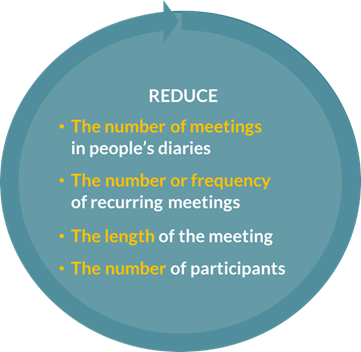
For meetings the short guide will provide useful hints and tips for running/attending successful meetings, the core request is that we work together to REDUCE:
- Please routinely include the following statement in any meeting invitations you send out: “If you do not feel you need to attend this meeting or would like to challenge the time allocated or the content, please contact the meeting organizer.”
- Similarly, please include the following disclaimer in any email you send out, at signature level: “In accordance with our digital charter, any mails received at night or on the weekend do not call for an immediate response.”
Change doesn’t just happen, so take the time to READ and ACT
on the advice provided in these short leaflets, articles and eLearning pieces:
HR are first promoters of change!
Thank you and do not hesitate to share with us with your testimonials and feedback.
Your HR for HR
3 Comments
Thanks for such a job. Will dedicate time for getting familiar with such tools and references!
Thanks very much for the follow up.
I can’t access the first two links? Do these work for everyone else?
Also, a tip, in case it’s helpful:
To make it easier to add the line recommended above to all outlook invites, you can set up a ‘Quick parts’ as follows:
– Open an invitation
– Paste the line you want to routinely add to your invite
– Go to ‘Insert’
– Click on Quick Parts (after Text box)
– Click ‘Save selection to Quick Part gallery’ and give it a relevant name
Next time you go to set up a meeting, click on Quick parts and select your file.
Thank you for such amazing practices for us. It is really useful😊